{< figure align=center src=“images/Online RAR Password Recovery.png” alt=“Online RAR Password Recovery”>}}
Free Online RAR Password Recovery (No Download)
The RAR format is widely used for compressing and archiving files. Many RAR/RAR5 archives are protected with a password to prevent unauthorized access. If you’ve lost or forgotten a password, our free online RAR password recovery tool for rar password recovery online helps you unlock RAR archives securely — with no signup, no subscription, and no software installation.
Our RAR password unlocker (online) for rar file password unlocker online supports common recovery strategies and guides you to narrow the search so you can recover a RAR password online as quickly as possible.
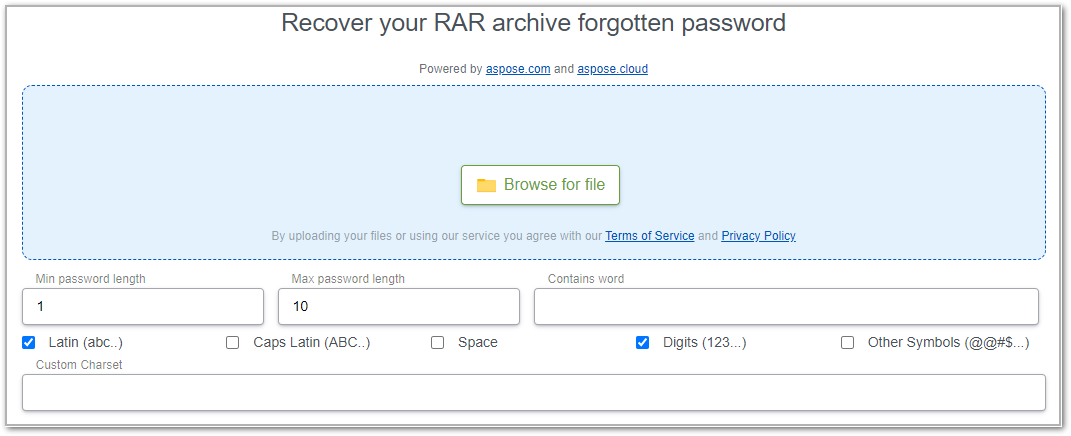
How to Recover a RAR Password Online
- Upload your RAR file — drag & drop or click to select for rar password recovery online.
- Set search hints — choose min/max password length and add any likely words, prefixes/suffixes, or character sets (e.g., only digits) or rar file password recovery online free.
- Start recovery — click Start to run the RAR password cracker routine with the rar password unlocker.
- Unlock & copy — when found, via rar password recovery, the current password is shown in your browser so you can open the RAR and extract files.
Security: Uploads are processed securely and removed within 24 hours.
Why Use an Online RAR Unlocker?
- No install, no signup — recover directly in your browser.
- Fast setup — tell the tool what the password might look like (length, words, digits/symbols) for much faster results.
- Free to use — no hidden fees.
- Private by design — no account or personal information required.
Tips to Speed Up RAR/RAR5 Password Recovery
- Narrow the length range (e.g., 6–8 instead of 1–12).
- Add “word hints” (names, years, brand, keyboard patterns).
- Limit character sets (only digits, only lowercase, add 1–2 symbols).
- Try a mask if you remember the shape:
Name####orAbc!???. - Start simple — short + common patterns often finish in seconds.
Reality check: Very long / fully random passwords can take significantly longer or may be impractical to recover with reasonable resources.
Developer Guide: Unlock Archive Passwords in .NET
Prefer a code-based workflow? Use our .NET library to attempt programmatic RAR password recovery and extraction in controlled scenarios.
- Install Aspose.ZIP for .NET: releases.aspose.com/zip/net/
- Use a targeted search (dictionary/mask) to minimize attempts. Example brute-force loop:
using Aspose.Zip;
string template = "T0p$ecret{0}{1}";
for (char c = 'A'; c <= 'Z'; c++)
{
    bool found = false;
    for (int i = 10; i <= 99; i++)
{
    string password = string.Format(template, c, i);
    try
    {
        using (var a = new Archive("encrypted.zip",
            new ArchiveLoadOptions { DecryptionPassword = password }))
        {
            a.ExtractToDirectory(".");
        }
        Console.WriteLine($"Password found: {password}");
        found = true;
    }
    catch (System.IO.InvalidDataException)
    {
        // wrong password, continue
    }
    if (found) break;
}
if (found) break;
}
> **Good practice:** Prefer **dictionary/mask attacks** with realistic patterns over blind brute force for substantial time savings.

## What’s Supported

* **Formats:** RAR / **RAR5** archives
* **Use cases:** forgot password, inherited archives, old backups
* **Access:** browser-based (no install), or **.NET library** for code workflows

## Limitations & Fair Use

* **No guarantees:** Recovery depends on **password complexity**.
* **Legal & ethical use only:** Only attempt recovery for archives you **own or are authorized to access**.
* **Performance constraints:** Extremely complex/long passwords may be infeasible within practical limits.

---

## Free RAR Password Unlocker — FAQs

**Is it possible to open a RAR file without the password?**
You need the correct password to extract files. The tool helps you **recover** that password via search strategies; once found, you can **open and extract** normally.

**How long does RAR password recovery take?**
From **seconds** (short/simple patterns) to **much longer** (long/random). You can **speed it up** by narrowing length, limiting character sets, and adding likely words.

**Does this work with RAR5 archives?**
Yes — the tool supports **RAR and RAR5**.

**Is the RAR password recovery tool really free?**
Yes. It’s **free** to use online with **no signup** and **no software download**.

**Is my data safe?**
Files are processed securely and **deleted within 24 hours**.

**What’s the difference between dictionary, mask, and brute force?**

* **Dictionary:** tries likely words/phrases (+ combos).
* **Mask:** tries passwords matching a pattern (e.g., `Name####`).
* **Brute force:** tries all combinations in a range (slowest).

**Can I recover very long, random passwords?**
If a password is both **long** and **truly random**, recovery may be **impractical**. Provide hints (length, patterns) for better odds.
