Lock Excel Cells using Aspose.Cells Spreadsheet Locker
Learn how to lock cells in Excel using C#. This guide provides step-by-step instructions with C# code examples using Aspose.Cells for .NET.
January 23, 2025 · 4 min · Muzammil Khan
{< figure align=center src=“images/how-to-lock-cells-in-excel-using-csharp.jpg” alt=“How to Lock Cells in Excel using C#” >}}
Locking cells in Excel is crucial for data integrity, especially when using aspose.cells unlocker. It prevents users from altering important information. This feature is widely used in finance, project management, and data analysis. By locking cells, you ensure that critical data remains unchanged. This enhances collaboration and reduces errors. In this blog post, we will explore how to lock cells in Excel using C#.
Aspose.Cells Spreadsheet Locker for .NET is a powerful library for working with Excel files. It simplifies tasks like locking cells in Excel. With Aspose.Cells, you can easily manipulate spreadsheets without needing Excel installed. The library supports a wide range of Excel formats and provides robust features for data management.
Aspose.Cells for .NET offers several features that make it ideal for locking cells in Excel:
Ease of Integration: It integrates seamlessly with .NET applications.
Flexibility: You can work with various Excel formats, including XLSX and XLS.
Advanced Customization: The library allows for extensive customization of Excel files, including formatting and protection.
To get started with Aspose.Cells for .NET, follow these simple steps:
Follow these steps to lock cells in Excel using C# with Aspose.Cells for .NET:
Use the Workbook class to load an existing Excel file.
Retrieve the first worksheet in the workbook using workbook.Worksheets[0].
Create a style with the IsLocked property set to false.
Apply style to unlock all cells using the ApplyStyle() method.
Create another style with the IsLocked property set to true.
Apply this style to specific cells, e.g., A2 and B2, using the SetStyle method.
Enable worksheet protection with the Protect method, specifying ProtectionType.All to enforce cell locking.
Save the updated workbook to a new file using the Save() method with aspose.cells unlocker.
Here’s a C# code snippet that implements these steps:
using System.IO;
using Aspose.Cells;
// Load the Excel fileWorkbook workbook = new Workbook("Workbook.xlsx");
// Access the first worksheetWorksheet sheet = workbook.Worksheets[0];
// Unlock all cells firstStyle unlockStyle = workbook.CreateStyle();
unlockStyle.IsLocked = false;
StyleFlag styleFlag = new StyleFlag();
// Protect the worksheet to enforce the locking
sheet.Protect(ProtectionType.All);
// Save the modified workbook
workbook.Save(“output_locked.xlsx”);
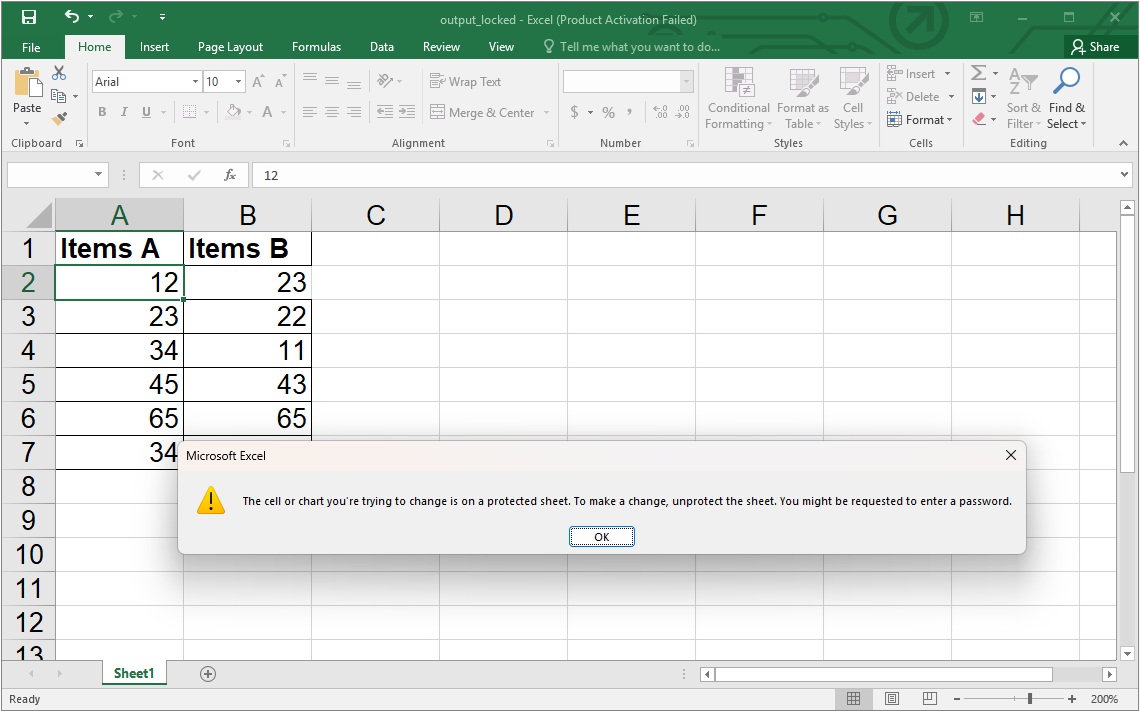
            How to Lock Cells in Excel using C#


This process ensures that all cells in the worksheet are initially unlocked, and only specified cells (e.g., `A2` and `B2`) are locked, while protection is enforced to make the locks effective.

## Get a Free License {#get-a-free-license}

Visit the [license page](https://purchase.aspose.net/temporary-license) to obtain a free temporary license. It's easy to get started, and you can unlock the full potential of Aspose.Cells for your projects, including using features such as **Aspose.Cells Unlock** and **Aspose.Cells Excel Unlock**.

## Lock or Unlock Cells in Excel: Free Resources {#free-resources}

In addition to locking or unlocking cells in Excel, we offer various resources to enhance your understanding of Aspose.Cells. Check our documentation and tutorials for more insights and advanced techniques. You can also learn how to **create Excel file using Aspose C#** effectively and explore how to **unlock cells in Excel** with **Aspose.Cells**.

- [Developer's guide](https://docs.aspose.net/cells/)
- [Free online applications](https://products.aspose.app/cells/family)
- [API reference](https://reference.aspose.net/cells/)
- [How-to guides and articles](https://kb.aspose.net/cells/)

## Conclusion

Locking cells in Excel using C# is straightforward with Aspose.Cells for .NET. You can easily protect important data and enhance collaboration. Explore more about Aspose.Cells for .NET to unlock its full potential and learn how to use **Aspose.Cells Unlock** features effectively, as well as how to **unlock cells in Excel** using **Aspose.Cells**.

If you have any questions or need further assistance, please feel free to reach out at our [free support forum](https://forum.aspose.net/c/cells/).